

When an attacker takes control of a mobile device without authorization and uses it maliciously, this is known as a phone hack. Once the hacker has access to the gadget, they can utilise it to steal private data, carry out other cybercrimes with it or even take over the entire thing.
There are many ways that a phone can be hacked, including malware and spyware, phishing attacks and software vulnerabilities. Hackers can also use social engineering techniques to trick users into installing malicious software or giving away sensitive information.
Unusual behaviour, such as new apps opening, texts or emails being sent without your knowledge or adjustments to your settings or contacts, are some typical indications that your phone may have been hacked. Other warning signals could be an unexpected rise in data usage, sluggish performance or pop-up advertisements.
Contents
How Can Your Phone Be Hacked?
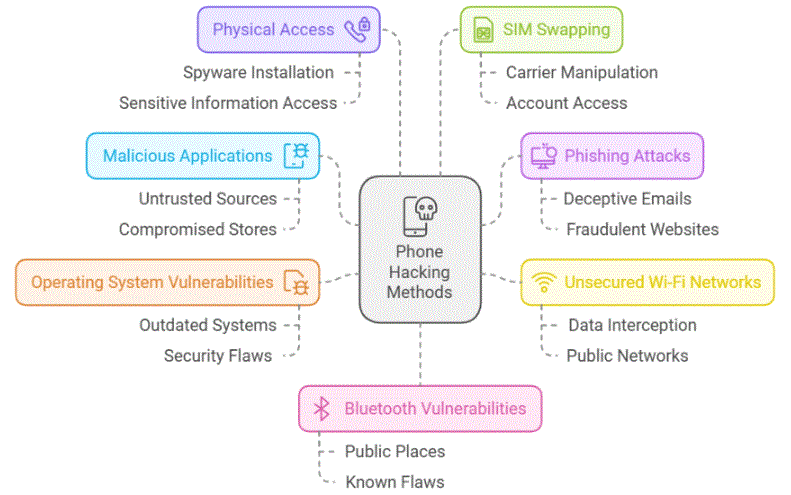
There are several ways a phone can be hacked, compromising it’s security and potentially exposing personal information. Understanding these methods is crucial for implementing effective preventive measures. Here are the primary ways a phone can be hacked:
- Malicious Applications: Downloading and installing apps from untrusted sources or even compromised official app stores can introduce malware to your device. These malicious applications may masquerade as legitimate software but contain code designed to exploit your phone’s vulnerabilities.
- Phishing Attacks: Cybercriminals often use deceptive emails, text messages or websites to trick users into revealing sensitive information or downloading malware. Clicking on suspicious links or entering personal information on fraudulent websites can lead to phone hacking.
- Unsecured Wi-Fi Networks: Connecting to public Wi-Fi networks without proper security measures can expose your device to potential attacks. Hackers can intercept data transmitted over these networks, potentially gaining access to your personal information.
- Operating System Vulnerabilities: Outdated operating systems may contain security flaws that hackers can exploit. Regular system updates are crucial for patching these vulnerabilities and maintaining device security.
- Physical Access: If an unauthorized person gains physical access to your unlocked phone, they may be able to install spyware or access sensitive information directly.
- SIM Swapping: In this method, hackers convince your mobile carrier to transfer your phone number to a new SIM card they control, potentially gaining access to accounts linked to your phone number.
- Bluetooth Vulnerabilities: Leaving Bluetooth on and discoverable in public places can expose your device to potential attacks, especially if the Bluetooth implementation has known security flaws.
Understanding these potential avenues of attack underscores the importance of maintaining vigilant security practices, such as regularly updating your device, being cautious about app downloads and network connections and implementing strong authentication measures.
Signs Your Phone May Have Been Hacked

Unusual Activity
Detecting potential phone hacking often involves recognizing unusual activity on your device. Key indicators include the unexplained appearance of new applications, messages or emails sent without your knowledge and unauthorized modifications to your settings or contacts list. These anomalies may signify a security breach, potentially compromising your personal information and device functionality. Regularly monitoring your phone’s behavior and being vigilant about changes can help you identify potential security threats promptly. If you observe any of these signs, it is advisable to take immediate action to secure your device and protect your data.
Battery Drain
Significant and unexpected battery drain can be a strong indicator of potential phone hacking. Malicious software or hacking tools operating in the background often consume substantial power, leading to noticeably shorter battery life. It is advisable to monitor your device’s battery usage patterns closely. If you observe a sudden and unexplained increase in power consumption, particularly when the phone is not in active use, it may warrant further investigation. Regular battery performance checks can help identify anomalies early, potentially alerting you to security breaches on your device.
Slow Performance
A sudden and significant decrease in your phone’s performance may indicate the presence of malicious software. Malware or spyware operating covertly can consume substantial system resources, resulting in reduced processing speed and responsiveness. This unauthorized software may execute complex operations in the background, leading to noticeable lag in routine tasks. If you experience unexplained slowdowns, particularly in applications or functions that previously operated smoothly, it may be prudent to investigate potential security breaches. Regular performance monitoring can help identify these issues promptly, allowing for timely intervention to maintain device security and functionality.
Increased Data Usage
An unexpected surge in data usage on your mobile device may indicate the presence of unauthorized software. Hacking tools often utilize your device’s data connection to transmit information to external parties, potentially compromising your privacy and security. This data consumption can occur even when your device is idle, underscoring the importance of regular monitoring. It is advisable to establish a baseline for your typical data usage and conduct periodic reviews. Any significant deviations from this baseline should prompt further investigation to ensure the integrity of your device and protect your personal information.
Pop-Up Ads
The appearance of unsolicited pop-up advertisements on your mobile device, particularly when no applications are in use, may indicate a malware infection. These intrusive advertisements not only disrupt the user experience but also pose potential security risks. They may serve as gateways to additional malicious software or phishing schemes designed to compromise your personal information. It is crucial to remain vigilant and monitor your device for such anomalous behavior. If you observe an increase in unexpected pop-up advertisements, it is advisable to conduct a thorough security assessment of your device to mitigate potential threats and safeguard your data.
What to Do If You Suspect Your Phone Has Been Hacked?
If you suspect that your phone has been hacked, it is important to take immediate action to protect yourself. Here are some steps you can take:
- Run a Malware Scan
To ensure the security of your mobile device, it is advisable to employ a reputable mobile antivirus application. This software will conduct complete scans to identify potential viruses or spyware that may have compromised your device. Upon detection, these applications typically offer removal capabilities, enabling you to eliminate identified threats and restore your device’s integrity.
- Change Your Passwords
Upon suspecting account compromise, immediate password modification is essential. Implement robust, unique passwords that resist guessing attempts. Where available, activate two-factor authentication to enhance security. This dual-layered approach significantly bolsters your accounts’ defenses against unauthorized access, providing an additional safeguard for your sensitive information.
- Seek Professional Help
If concerns about your phone’s security persist, seeking professional assistance is advisable. Cybersecurity experts possess the expertise to conduct thorough device analyses, identifying and eliminating any malicious software present. Their specialized knowledge ensures a safe approach to addressing potential security breaches, providing you with peace of mind regarding your device’s integrity and the safety of your personal information.
Conclusion
Maintaining vigilance regarding potential phone hacking is crucial for protecting personal information and digital security. It is essential to be cognizant of indicators that may suggest unauthorized access to your device. Regular implementation of preventive measures can significantly mitigate the risk of cybercrime. These measures include conducting routine malware scans to detect and eliminate potential threats. Additionally, implementing a practice of regular password updates enhances account security. It is advisable to create complex, unique passwords for each account to minimize vulnerability. In situations where there is a strong suspicion of device compromise, seeking the expertise of cybersecurity professionals is recommended. These specialists possess the knowledge and tools necessary to conduct thorough device assessments and address any identified security breaches effectively. By adopting a proactive approach to digital security, individuals can substantially reduce their exposure to cyber threats and safeguard their personal information.