

Diving has changed dramatically thanks to new technology that makes exploring the ocean safer and more enjoyable than ever before. Just ask any experienced diver who remembers the old days of using basic depth gauges and dive tables. “When I first started diving 20 years ago, we had to do all our calculations manually. Now, with modern dive computers, I can focus on enjoying the beautiful marine life instead of constantly checking tables,” shares a diving instructor with over 1000 dives.
The introduction of dive computers has been a game-changer for both new and experienced divers. These smart devices help divers track everything about their underwater adventure, from how deep they’re going to how long they can stay underwater safely. Many beginners find these devices incredibly helpful in building their confidence underwater. As one recreational diver puts it, “Having a dive computer is like having a knowledgeable buddy who’s always looking out for your safety. It gives me peace of mind, especially when I’m exploring new diving spots.”
Contents
Considerations for Choosing Dive Computers
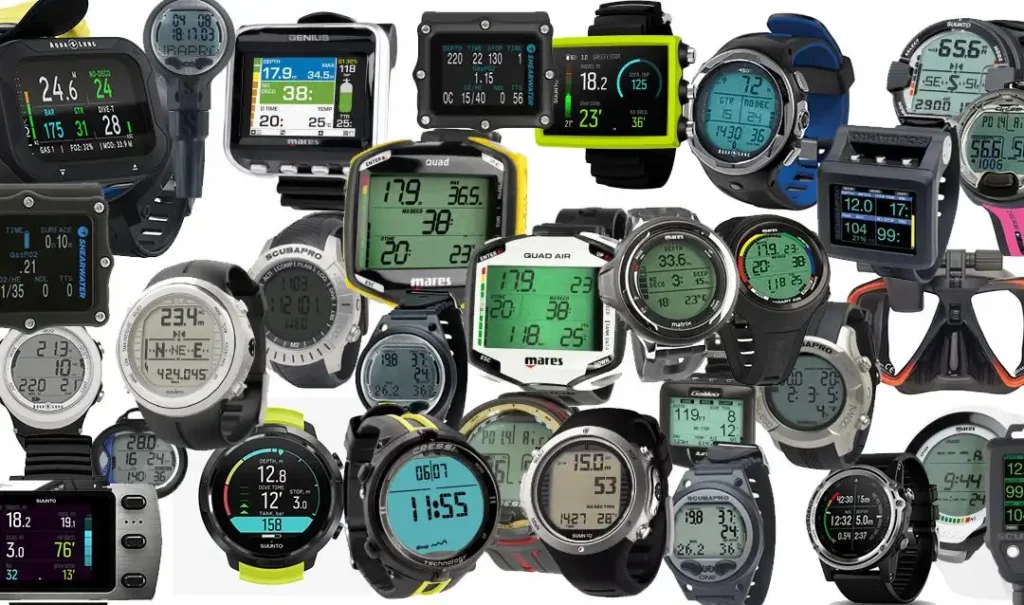
Picking the right dive computer might seem overwhelming at first, but it’s actually quite simple when you break it down. A diving equipment shop owner with 15 years of experience explains, “The biggest decision most divers face is choosing between a wrist-mounted or console-mounted computer. Wrist-mounted ones are like wearing a watch – they’re light and easy to check while swimming. Console-mounted ones are bigger and usually attached to your pressure gauge.” Many experienced divers recommend starting with a wrist-mounted computer for it’s simplicity and convenience.
Another important factor is how easy the computer is to use underwater. “Look for big, clear numbers and simple button controls,” suggests a dive master who trains new divers regularly. “You don’t want to be fumbling with tiny buttons when you’re 60 feet underwater.” Long-time divers also emphasize the importance of choosing a computer that can grow with your diving journey. As one technical diver notes, “I started with a basic model. But as I advanced in my diving, I was able to use it’s more advanced features. It’s worth investing in a computer that can handle both beginner and intermediate diving.”
For a wide selection of dive gear, check: abyss.com.au/en/dive-gear
Best Entry-Level Dive Computers for Beginners
When you’re just starting your underwater journey, you want a dive computer that’s easy to understand and won’t overwhelm you with complicated features. A diving instructor with over 500 training sessions shares. “For my students, I always recommend starting with straightforward computers that have clear displays and simple menus. The less they have to think about their equipment, the more they can focus on developing their diving skills.”
Entry-level computers typically cost between $200-400, offering essential features like depth monitoring, dive time tracking and basic safety alerts. A dive shop owner notes, “Many new divers get anxious about choosing their first computer, but modern entry-level models are designed to be incredibly user-friendly. They’re like having a simple underwater guide that keeps you safe.” These computers often come with basic planning modes and clear safety stop countdown timers.
Mid-Range Dive Computers for Regular Divers
For those who dive regularly and want more features without breaking the bank. Mid-range dive computers offer an excellent balance of functionality and value. These models, typically priced between $400-800, pack more advanced features while maintaining user-friendly operation. An experienced dive guide explains, “Mid-range computers are perfect for divers who go out every few weeks. They offer more detailed dive planning options, better battery life and usually connect to your phone for easy dive logging.”
These computers often include additional features like air integration capability, multiple gas modes and more sophisticated decompression calculations. A marine photographer shares their experience: “After upgrading to a mid-range computer. I discovered how helpful features like detailed depth tracking and temperature monitoring could be for planning my underwater photo sessions. The ability to switch between different diving modes has also made it perfect for both shallow reef dives and deeper wreck explorations.”
Advanced Dive Computers for Technical Divers
For serious technical divers who push the limits of recreational diving, advanced dive computers provide the sophisticated features needed for complex dives. These high-end models, usually priced above $800, offer comprehensive functionality for technical diving scenarios. A cave diving instructor explains, “At this level, you need a computer that can handle multiple gas mixes, complex decompression calculations and provide detailed real-time data during long dives.” Advanced computers typically feature full trimix capabilities, multiple algorithm options and extensive customization possibilities.
A technical diving instructor with over 2000 dives shares, “These computers are like having a complete diving control center on your wrist. They can handle everything from simple air dives to complex mixed-gas decompression dives with multiple gas switches.” The robust build quality and reliability of these computers make them essential tools for challenging dive conditions. A professional underwater researcher notes, “When you’re doing multiple deep dives with different gas mixes, having a computer that can track everything precisely becomes crucial for safety.”
Benefits of Using a Dive Computer

Dive computers provide a range of benefits, such as real-time monitoring of depth and dive time, decompression and ascent rates and air consumption. With a dive computer, you will know exactly when it is time to ascend or stop your ascent, helping you to avoid any potential hazards. Additionally, a dive computer can track your dive history, allowing you to review your dive profile and share it with your dive buddies or dive instructor. Having a dive computer can help you make the most of your dive experience and make sure you stay safe underwater.
Key Benefits of Using a Dive Computer
| Benefit | Description | Impact on Diving |
|---|---|---|
| Real-Time Safety Monitoring | Continuous tracking of depth, time and decompression status | Prevents decompression sickness and ensures safer ascent rates |
| Enhanced Focus on Diving Experience | Reduces mental calculations and manual monitoring | Allows divers to fully immerse in the experience while maintaining safety |
| Automatic Dive Logging | Records detailed dive profiles and history automatically | Enables continuous learning and improvement |
| Emergency Alerts | Immediate warnings for rapid ascents or safety violations | Prevents common diving accidents and promotes safer diving practices |
| Precise Dive Planning | Calculates no-decompression limits and dive times accurately | Maximizes dive time while maintaining safety margins |
| Temperature Monitoring | Tracks water temperature changes throughout the dive | Improves comfort and safety in varying conditions |
| Air Consumption Analysis | Tracks air usage patterns over multiple dives | Helps develop better air management skills |
| Multi-Dive Calculations | Accounts for residual nitrogen between dives | Enables safer repetitive diving |
| Altitude Adjustment | Automatically adjusts calculations for altitude changes | Makes altitude diving safer and simpler |
| Historical Data Analysis | Provides long-term dive history and statistics | Supports continuous skill development and certification progress |
Battery Life and Maintenance
Most systems use a rechargeable lithium-ion battery, which will last roughly 10 dives or 10 hours of continuous use between charges. If your dives are particularly long or deep, you may need a longer battery life, so be sure to check the manufacturer’s specifications. Most dive computers are easy to maintain and require only occasional cleaning and battery maintenance. Be sure to read the instruction manual to make sure you are properly maintaining your dive computer.
Accessories and Software Support
Accessories can include additional items such as mounts, straps and carrying cases while software support is important for the maintenance and upkeep of your dive computer. It is important to look at the available software support offered by the manufacturer and the associated cost. Additionally, look for programs that allow you to download your dive information and analyze it in order to gain the most out of your dive computer.
| Category | Item/Feature | Purpose | Typical Cost Range |
|---|---|---|---|
| Physical Accessories | |||
| Extended Straps | Fits over thick wetsuits/drysuits | $15-40 | |
| Screen Protectors | Prevents screen scratches | $10-25 | |
| Protective Cases | Safe storage and transport | $20-50 | |
| Bungee Mounting Kit | Alternative to traditional straps | $15-30 | |
| Software Features | |||
| Mobile App Integration | Syncs dive data to smartphone | Usually Free | |
| Cloud Storage | Backs up dive logs online | $0-5/month | |
| Social Sharing | Share dive logs with community | Free | |
| Route Mapping | Plots underwater routes | Included | |
| Connectivity | |||
| USB Cable | Direct computer connection | $15-30 | |
| Bluetooth Dongle | Wireless data transfer | $25-50 | |
| NFC Reader | Quick data transfer | $30-60 | |
| Analysis Tools | |||
| Dive Planning Software | Advanced dive planning | $0-100 | |
| Training Analysis | Tracks skill progression | Included | |
| Gas Consumption Analysis | Tracks air efficiency | Included | |
| Maintenance Items | |||
| Battery Kits | DIY battery replacement | $20-40 | |
| O-Ring Sets | Maintains water resistance | $10-25 | |
| Contact Cleaner | Maintains connectivity | $8-15 |
FAQs
For your first dive computer, expect to spend between $200-400. A dive shop owner with 15 years of experience explains, “You don’t need the most expensive model to start. Focus on getting a reliable, user-friendly computer that matches your current diving level. Many of my students start with basic models and upgrade later as their skills advance.” Remember that spending more doesn’t always mean better – it’s about finding the right computer for your needs.
While air integration is a fantastic feature, it’s not essential for beginners. A seasoned diving instructor shares, “I recommend my new students focus on mastering basic diving skills first. Air integration is more valuable once you’re doing longer, deeper dives or technical diving.” If you’re just starting, a standard dive computer without air integration will serve you well. You can always upgrade later when your diving style demands it.
Battery life varies depending on the type of computer you have. A dive equipment technician explains, “Rechargeable models typically last 15-30 dives per charge, while computers with replaceable batteries can last 150-300 dives. The key is regularly checking your battery status before any dive trip.” Many divers prefer rechargeable models for regular diving, as they’re more convenient for daily use and environmentally friendly.
This is a crucial safety consideration that every diver should be prepared for. An experienced dive safety instructor shares, “Always have a backup plan. This means diving with at least a depth gauge and timing device as backup. Most importantly, stay calm and follow your emergency ascent procedures.” Many divers also recommend practicing emergency scenarios regularly with your dive buddy.
Conclusion
The evolution of diving technology, especially dive computers, has truly transformed the underwater exploration experience. As one veteran diver with three decades of experience puts it: “What used to be an activity reserved for the most technical-minded people has become accessible to anyone with a passion for underwater adventure.” The advancement in dive computer technology continues to make diving safer and more enjoyable for everyone, from weekend hobbyists to professional marine researchers. A diving safety instructor reflects, “In my 15 years of teaching, I’ve seen how modern dive computers have dramatically improved diver safety and confidence. They’ve taken the complexity out of dive planning and let people focus on what matters – enjoying the beautiful underwater world.”
The future of diving technology looks even more promising, with new features being developed every year. “It’s exciting to think about what’s next,” shares an enthusiastic cave diver. “From improved battery life to even more advanced safety features, dive computers keep getting better at helping us explore the ocean safely and confidently.” Whether you’re just starting your diving journey or are an experienced explorer of the deep, today’s dive computers offer the perfect blend of safety, functionality and user-friendliness to enhance your underwater adventures.