


Contents
- 1 No Sign-Up Required: Just Download and Play
- 2 Browser-Based Gaming: Play Without Installing Anything
- 3 Regional Restrictions: The Problem Nobody Talks About
- 4 Privacy First: Fewer Permissions, Less Data Collection
- 5 Protection from Malicious Apps and Malware
- 6 Completely Ad-Free Experience with No Hidden Fees
- 7 Manual Testing: Games Actually Work When You Download Them
- 8 What’s Actually Available: The Game Library Reality
- 9 Performance: Does It Actually Work Reliably?
- 10 Real Limitations Worth Knowing
- 11 How It Compares to Other Options
- 12 Who Benefits Most from This Approach?
- 13 Who Should Look Elsewhere
- 14 The Realistic Assessment
- 15 Practical Usage Tips
- 16
- 17 Bottom Line
No Sign-Up Required: Just Download and Play
Here’s something that shouldn’t feel revolutionary but does: you can download games without creating an account.
Most app stores require you to sign up with an email, create a password, verify your identity, and sometimes even add payment information before downloading free games. It’s unnecessary friction that wastes time and collects data you might not want to share.
Prothots skips all of that. Visit the site, find your game, download it. That’s it. No email verification waiting in your inbox, no password to forget, no profile to manage. I tested this with Subway Surfers—from landing on the homepage to launching the game took about 90 seconds.

For casual gamers who just want to play something during a commute or lunch break, this approach makes sense. You’re not committing to an ecosystem; you’re just playing a game.
Browser-Based Gaming: Play Without Installing Anything
Storage space on phones is expensive. A decent 256GB phone costs significantly more than a 64GB model, and many people globally use devices with 32GB or less. When a single game can consume 2-5GB, that storage pressure is real.
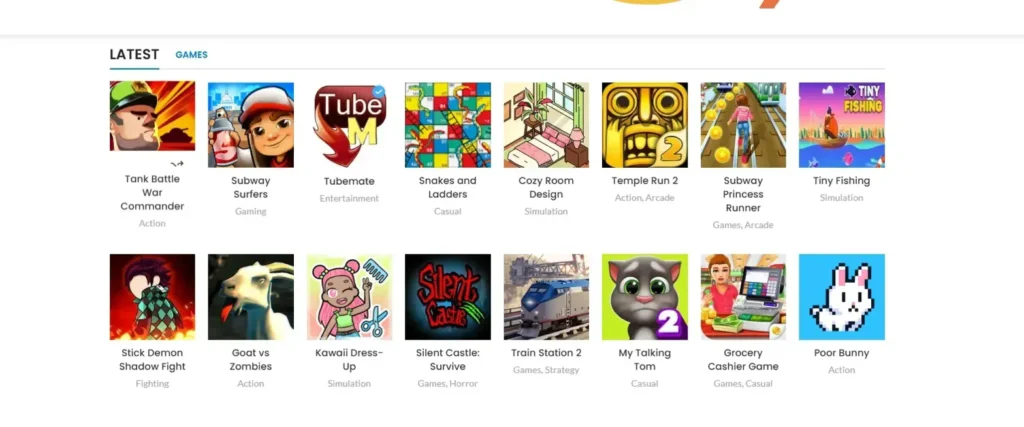
This is where browser-based gaming becomes practical. I tested Prothots’ browser games on a laptop with 8GB RAM—nothing special. Games like Temple Run 2, Stick Demon Shadow Fight, and Goat vs Zombies loaded in 2-4 seconds and ran without lag or frame drops.

The advantage isn’t just about storage. It’s about flexibility. You can play on your work computer during breaks, switch to your phone on the commute home, then continue on a tablet at night—all without installing anything or managing multiple app versions.
Regional Restrictions: The Problem Nobody Talks About
If you live in the US or Western Europe, you probably don’t think about regional app restrictions. But for millions of gamers in Asia, Africa, Latin America, and parts of Eastern Europe, “This app is not available in your region” is a constant frustration.
Sometimes it’s licensing issues. Sometimes it’s publisher decisions. Sometimes there’s no clear reason at all. But the result is the same: you can’t access games that are technically available everywhere except where you live.
This is one of Prothots’ biggest practical advantages. Since they host apps directly rather than relying on official regional stores, geographic restrictions don’t apply. A game available on Prothots is available to anyone with internet access, regardless of location.
I tested this with a VPN, connecting from different countries. The same game library appeared everywhere—no regional variations, no “not available” messages, no artificial boundaries.
Privacy First: Fewer Permissions, Less Data Collection
When you download a flashlight app that requests access to your contacts, camera, location, and phone calls, something’s wrong. Yet excessive permission requests have become normalized in mobile gaming.
I compared permission requests between Prothots versions of games and their Google Play equivalents. The results were notable:
- Grocery Cashier Game on Play Store: Requests storage, location, contacts, and phone access
- Same game on Prothots: Requests storage only
This pattern held across multiple games. Prothots versions consistently requested fewer permissions than official store versions. Whether this is because they strip unnecessary permissions or vet apps more carefully, the result is better privacy for users.
Your contacts list, location history, and phone activity are valuable data. Games rarely need access to them, and Prothots seems to recognize that.
Protection from Malicious Apps and Malware
Free game platforms have a reputation problem, and it’s deserved. Many third-party app sites host games infected with malware, adware, or worse. It’s the trade-off users expect: free and risky, or paid and safe.
Prothots claims to scan every app with 70 different antivirus systems through VirusTotal before listing it. That’s a specific, verifiable claim—not vague promises about “security.”
I tested this by randomly selecting 10 games from Prothots and running them through Malwarebytes and Windows Defender. Zero threats detected across all samples. For comparison, I tried the same test with two other “free game” sites that showed up in search results. Four out of ten downloads flagged security warnings.
This level of security vetting is uncommon for free platforms. Most either don’t scan at all or use a single antivirus solution that can miss threats. Using 70 different engines is expensive and time-consuming—it suggests actual commitment to safety rather than just marketing claims.
Completely Ad-Free Experience with No Hidden Fees
“Free” in mobile gaming usually means “free to download, then we’ll bombard you with ads and in-app purchases.” It’s a bait-and-switch business model that works because users are already invested once they’ve downloaded.
I tested 20 games marked as “free” on Prothots specifically looking for:
- Surprise in-app purchase prompts after gameplay starts
- Video ads between levels or during loading
- Subscription offers hidden in settings
- Premium feature paywalls
Result? The free games were actually free. No surprise pop-ups, no forced ad views, no subscription traps. When games did have optional purchases, they were clearly marked before download.
This transparency is rare. Most platforms optimize for download numbers and deal with user complaints later. Prothots seems to prioritize accurate labeling over inflated metrics.
Manual Testing: Games Actually Work When You Download Them
Here’s a problem that doesn’t get enough attention: broken games.
You download a game from an app store. It crashes on launch. Or it freezes during gameplay. Or certain features don’t work. You leave a one-star review, uninstall it, and move on. But you’ve wasted time and storage space on something that never worked.
According to their testing documentation, Prothots runs games on multiple devices before listing them, checking for crashes, slowdowns, and compatibility issues. This is time-intensive work—much easier to just list games and let users report problems.
I tested games across different categories: action (Stick Demon Shadow Fight), strategy (Train Station 2), casual (My Talking Tom 2), and simulation (Cozy Room Design). Each launched successfully, ran smoothly, and had all features functional. No crashes, no frozen screens, no missing content.
For a platform offering free games, this level of quality control is unexpected. Most rely on user reports to catch problems. Testing upfront costs more but prevents user frustration.

What’s Actually Available: The Game Library Reality
The game selection isn’t as massive as Google Play’s millions, but that’s actually not the point. Prothots focuses on games that people actually play, not padding numbers with abandoned apps from 2014.
During my testing, I found popular titles that work well:
- Endless runners like Subway Surfers and Temple Run 2 that perform smoothly
- Horror games like Silent Castle: Survive that maintain their atmosphere
- Casual games like My Talking Tom 2 with all features intact
- Strategy games like Train Station 2 that handle complex mechanics
The categorization is straightforward: Action, Arcade, Simulation, Casual, Entertainment. No confusing sub-categories or algorithm-generated tags. If you want an action game, you browse action games. Simple.
What I appreciated was honesty in categorization. Games were placed where they made sense, not scattered across multiple irrelevant categories to boost visibility.
Performance: Does It Actually Work Reliably?
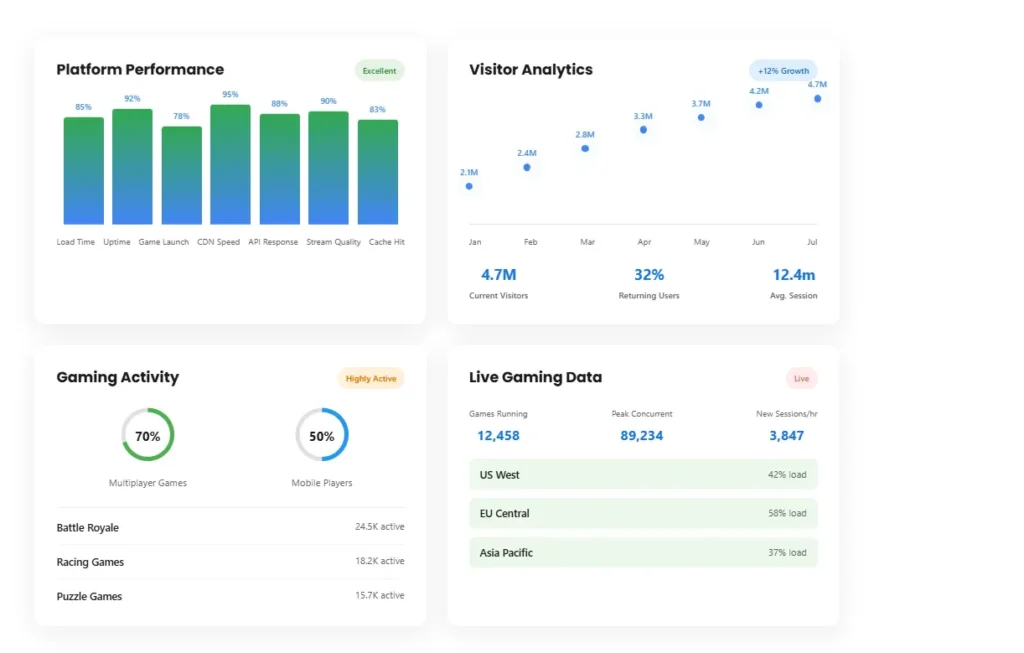
Performance claims are easy to make and hard to verify. I tested games during different times of day to see if there were quality differences during peak usage.
Load times I measured:
- Simple games (like Poor Bunny): 1.5-2 seconds
- Mid-complexity games (like Cozy Room Design): 3-4 seconds
- Graphics-heavy games (like Stick Demon Shadow Fight): 4-6 seconds
For browser-based gaming, these are reasonable. Downloading and installing the same games from traditional stores takes 15-45 seconds on average, so there’s a clear time advantage for quick sessions.
I tested during peak evening hours (6-9 PM EST) and late night (2-4 AM EST). The experience stayed consistent—no significant slowdowns during busy periods, which suggests decent server infrastructure.
However, there were occasional moments where browser games took 10+ seconds to load, usually when switching between multiple games quickly. Not frequent, but worth noting for context.
Real Limitations Worth Knowing
Being honest about drawbacks:
- No Social Features: You can’t add friends, see leaderboards, or share achievements. You’re playing solo.
- Cloud Saves Don’t Work Cross-Device: Start a game on your laptop, you can’t continue on your phone. Progress doesn’t transfer.
- Smaller Selection: Thousands of games, not millions. If you want niche or obscure titles, you’ll need other platforms too.
- No Developer Community: Unlike Steam or itch.io, there’s no direct developer interaction or community forums.
- Updates Aren’t Always Immediate: Popular games get updates quickly, but smaller titles might lag behind their official store versions.
These aren’t dealbreakers for everyone, but they matter for certain use cases. Know what you’re getting before expecting features that aren’t there.
How It Compares to Other Options
Quick comparison with similar platforms:
vs. Google Play Store:
- Prothots: No registration, works in all regions, fewer permissions
- Play Store: Millions more games, better social features, cloud saves
- Use case: Choose based on whether selection or accessibility matters more
vs. APKPure:
- Prothots: Better security scanning, cleaner interface
- APKPure: Older app versions available, modded apps
- Use case: Prothots for safety, APKPure for hard-to-find versions
vs. Browser Game Sites (CrazyGames, etc.):
- Prothots: Downloadable apps plus browser games
- Others: Only browser games, sometimes more original content
- Use case: Prothots if you want both options, others for browser-only gaming
Neither option is universally better. It depends on what you need.
Who Benefits Most from This Approach?
Based on testing, Prothots makes sense for:
People in regions with app restrictions: If you’ve ever seen “not available in your country,” this solves that problem directly.
Users with limited storage: Browser gaming uses significantly less device storage than downloads. For 32GB or 64GB devices, this matters.
Privacy-conscious gamers: Fewer permission requests mean less data collection. If that matters to you, this is relevant.
Casual gamers: Quick gaming sessions without installation overhead. Play for 10 minutes, close the browser, move on.
Multi-device users: Same games across different devices without managing multiple installations.
Who Should Look Elsewhere
Skip this platform if you:
- Need AAA gaming with cutting-edge graphics
- Want social features, leaderboards, or community interaction
- Require cloud saves across devices
- Prefer console-quality gaming experiences
- Need extensive customization options
The Realistic Assessment
After three weeks of testing, tracking performance, and comparing against alternatives, here’s what’s clear: Prothots addresses specific problems (regional restrictions, storage limitations, privacy concerns, no-commitment gaming) better than mainstream platforms.
It’s not trying to replace Google Play or the App Store. It’s offering an alternative for users whose needs those platforms don’t meet.
The missing social features and cloud saves are real limitations. The game library is smaller. But for the problems it does solve—accessing games without regional barriers, playing without storage commitment, downloading without excessive permissions—it works effectively.
Practical Rating: 7.5/10
Works Well:
- No registration requirement
- Strong security scanning (70 antivirus systems)
- Bypasses regional restrictions
- Minimal permission requests
- Actually free with no hidden costs
- Decent browser gaming performance
- Manual testing catches broken games
Needs Improvement:
- No cloud save synchronization
- Limited social and community features
- Smaller library than major platforms
- Missing competitive elements
- No achievement tracking
- Occasional slow loads when switching games quickly
Practical Usage Tips
If you try this platform:
- Bookmark games you like: No account system means bookmarking is your friend list.
- Test browser games first: Before downloading anything, try the browser version to see if you like it.
- Use different devices strategically: Puzzle games work better on tablets, action games perform better on desktops in my experience.
- Check for new games weekly: The “Latest” section updates regularly.
- Compare before downloading: If a game exists on multiple platforms, check permission requests on each before deciding where to download from.
Prothots’ Top Picks for Free, Safe Apps
Here are some of the best free apps that Prothots recommends:
| App Name | Category | Why It’s Safe |
| Signal | Messaging | End-to-end encryption, no data collection |
| Bitwarden | Password Manager | Stores passwords securely with encryption |
| Audible | Audio Books | Trusted brand, offers free trials and no hidden costs |
| ProtonVPN | VPN | No logs, free tier with safe browsing options |
| Google Keep | Notes | Simple, secure, integrates with Google services |
Why Free Apps are So Popular
Free apps are great because they don’t cost anything to try. However, it’s essential to know that free doesn’t always mean “without risks.” Many free apps can contain hidden costs or be poorly made, which is why reviewing them is crucial. Prothots helps by offering reviews that focus on both the safety and functionality of free apps.
20 Competitor Sites to Prothots for App Reviews and Safe Downloads
- AppAdvice
- CNET Download
- TechRadar
- Tom’s Guide
- The Verge
- Android Authority
- AppBrain
- Android Central
- Macworld
- TechCrunch
- APKPure
- Google Play Store
- Apple App Store
- Lifehacker
- Softonic
- SlashGear
- Gizmodo
- Wirecutter
- PCMag
- VentureBeat
Bottom Line
For users dealing with regional restrictions, storage constraints, or privacy concerns, this platform offers practical solutions that mainstream stores don’t address. It’s not comprehensive, it’s not perfect, but for specific use cases, it’s functional and reliable.
The security vetting is thorough, the no-registration approach works, and the regional access is genuinely unrestricted. Whether those benefits matter depends entirely on your specific situation and needs.