


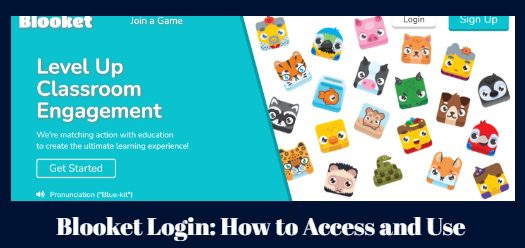
Blooket is an innovative online learning platform that allows teachers and students to play fun, game-based learning activities. With Blooket, educators can transform core curriculum topics into engaging quiz games to motivate students. Students can practice skills in math, reading, science, social studies, and more while earning rewards.
In this article, we will guide the critical aspects of using and how to join Blooket, including:
- What is Blooket, and how it works
- Benefits of using Blooket
- Creating a Blooket account
- Blooket Login
- Playing Blooket games
- Creating custom games in Blooket
- Managing student accounts and progress monitoring
- Tips, tricks and best practices for using Blooket
- The future of game-based learning
Whether you are a teacher looking to engage your students in learning or a parent interested in supplemental learning activities, this guide will provide an in-depth look at maximizing the Blooket platform. Let’s get started!
Contents
- 1 What is Blooket and How Does it Work?
- 2 The Benefits of Using Blooket
- 3 Blooket Account Sign Up
- 4 COPPA Compliance and Student Accounts
- 5 Blooket Login
- 6 Joining Blooket Games
- 7 Creating Blooket Games
- 8 Using Blooket Effectively in the Classroom
- 9 Tips, Tricks and Best Practices for Using Blooket
- 10 Alternatives to Blooket
- 11 Gimkit
- 12 The Future of Blooket
What is Blooket and How Does it Work?
Blooket is a game-based learning platform created by teachers and game designers. It offers an extensive library of ready-made games spanning a variety of subjects and skills, from math facts to grammar concepts. Educators can also build their customized games using Blooket’s intuitive game builder.
Blooket’s game modes are designed to provide an optimal mix of learning and fun. They leverage research-backed techniques like spaced repetition, interleaving, and rewards-based motivation. Game mechanics add excitement, while sound effects and animations appeal to students’ senses.
Here’s an overview of how Blooket works:
- Access: Teachers and students access Blooket through any web browser on a computer, laptop, tablet or smartphone. No downloads or special software is required.
- Account setup: Educators sign up for a free teacher account. Students can play as guests or log in with Google.
- Game library: Blooket’s library includes thousands of games across K-12 subjects. Games cover math skills, vocabulary, science concepts, historical events and more.
- Custom games: Educators can also build their games with customized questions. The game builder is easy to use with different templates.
- Gameplay: Students join games with a unique code provided by the teacher. They play solo or in teams and race to answer questions correctly to earn points. Games are self-paced but timed.
- Rewards: Correct answers allow students to collect items, level up characters (known as Blooks), and unlock rewards. These prizes motivate gameplay.
- Results: Teachers can view rich analytics after games, including question breakdowns and individual student performance data. Insights allow customized reteaching.
This game-based learning approach boosts engagement, retention, and academic performance, according to studies on Blooket’s effectiveness. Next, we’ll examine the benefits for both students and teachers.
The Benefits of Using Blooket
Research shows that game-based learning platforms like Blooket offer many advantages over traditional pen-and-paper learning. Let’s examine some of the key benefits:
Benefits for Students
- Boosts engagement and motivation: Games make learning more fun and exciting. The competitive elements, rewards system, animations and sound effects grab and hold student attention.
- Promotes collaboration: Playing in teams encourages communication, cooperation and peer teaching as students work together towards common goals.
- Provides differentiated instruction: Games can be tailored to different skill levels, allowing students to be challenged at their own pace.
- Improves retention and outcomes: Game-based learning leads to better long-term retention than lectures. Scores and grades improve across subjects.
- Encourages perseverance: Games allow low-stakes failure, so students learn to persist through challenges. Rewards motivate continual effort.
- Supports personalized learning: Data analytics lets teachers identify student needs for customized instruction and remediation.
- Accessible learning: Blooket works on any device with internet access, enabling learning anywhere. Students can review games for practice.
Benefits for Teachers
- User-friendly platform: Blooket is intuitive for teachers to start using instantly. No advanced tech skills are needed.
- Saves prep time: The extensive game library means less time planning lessons. Custom games are easy to build.
- Boosts student participation: The game format results in more students volunteering to participate than traditional lessons.
- Facilitates data-driven teaching: Robust analytics provide granular insight into student strengths and weaknesses to personalize instruction.
- Promotes active learning: Games keep students engaged compared to passive listening. Active learning enhances understanding and recall.
- Enables seamless review: Quick games regularly assess previously learned material for better retention.
- Simplifies differentiation: Adjustable game settings allow teachers to modify difficulty for students’ diverse needs and learning pace.
- Works for all subjects: From math to social studies, ready-made games cover essential knowledge and skills across the curriculum.
For both students and teachers, the benefits of game-based learning are clear. Blooket unlocks critical advantages compared to traditional pen-and-paper approaches to education. Next, we’ll create an account on Blooket as an educator or parent.
Blooket Account Sign Up
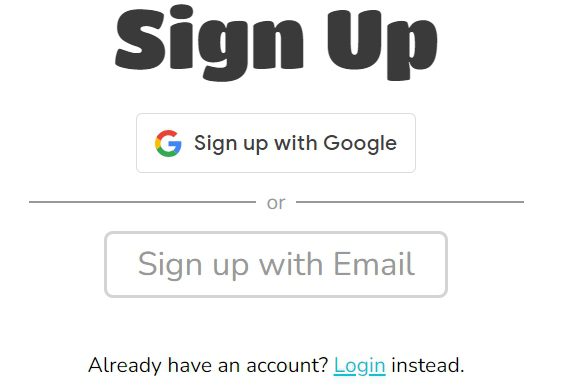
Creating an account on Blooket provides access to all features for educators and parents. Here are step-by-step instructions to sign up:
- Go to the Blooket homepage. Enter https://www.blooket.com/ into any web browser. The homepage displays.
- Click “Log In” in the top right. This opens the Blooket login popup modal window.
- Click “Sign up” below the password field. This opens the signup page.
- Enter your information. Fill in your name, email, password and grade level you teach.
- Check the consent box. This agrees to Blooket’s Terms of Service and consents to receive updates from Blooket.
- Click “Create Account.” Check your email to confirm your account.
Once your account is activated, you can Blooket login into Blooket anytime. Access the entire platform to play games in the library, view analytics, create custom games and manage student accounts.
Setting up a parent account follows the same process. Parents can use Blooket for supplemental learning by playing games with their children. There is also a guest login that allows playing games without an account.
For students under 13, COPPA compliance requires additional steps, which we’ll cover next.
COPPA Compliance and Student Accounts
Blooket complies with the U.S. Children’s Online Privacy Protection Act (COPPA), which governs data collection on children under 13. This requires parental consent to create student accounts.
Teachers have two options for setting up student accounts:
1. Sponsored Accounts
- The teacher provides parents with unique student verification codes
- Parents give consent and set up accounts at home
- Allows for progress tracking and analytics
2. Google Managed Accounts
- Teacher creates Classroom in Google Workspace for Education
- Students Blooket login in through Google with school accounts
- Limited analytics but easy setup
COPPA laws ensure students’ privacy is protected. Games can still be played without accounts via guest login.
For teachers, navigating Blooket privacy settings helps manage compliance. Options include:
- Disabling chat and commenting features
- Limiting the sharing of student data
- Restricting accounts to teacher control
With the proper setup, Blooket provides a COPPA-compliant way to get students playing while protecting their information. Next, we’ll walk through the login process.
Blooket Login
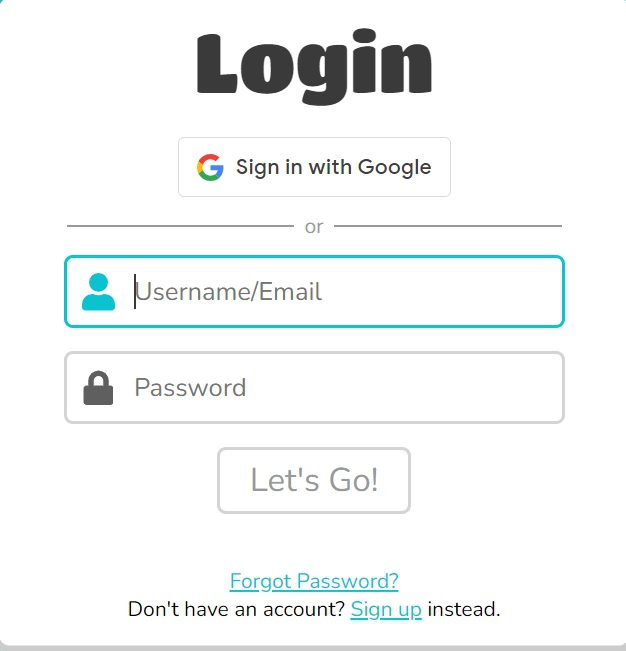
Once you’ve created an account, signing in allows full access to Blooket’s features. Here are the steps to Blooket login into your teacher, parent or sponsored student account:
- Go to Blooket.com. The homepage loads.
- Press “Blooket LogIn.” The pop-up window for login opens.
- Enter your account email. Type the email you used to create your Blooket account.
- Enter your password. Type the password you set when you created your account.
- Press “Log In.”You are now logged into the dashboard of your Blooket account.
You also Blooket LogIn through Google account. Click the “Blooket Login with Google” button and sign in with your Google credentials.
For students with sponsored accounts, their Blooket login process involves an additional step. Students enter their verification code provided by the teacher after entering their password. This allows the platform to confirm parental consent.
Logging in enables educators and parents to access all Blooket features. Next, we’ll explore playing games and understand the student experience.
Joining Blooket Games
Once logged into your Blooket account, you can start joining games created by your teacher. There are a couple of ways for students to access assigned games:
Entering Game ID
- Get the unique game ID from your teacher. Game IDs consist of 6 characters.
- Go to the Blooket homepage and click the “Join Game” button.
- Input the game ID in the text box and click play.
Scanning QR Code
- Have your teacher display the unique QR code for the game.
- Open the Blooket homepage on your device.
- To scan a QR code, move the camera on your device over it.
- The game will automatically open after scanning the code successfully.
After joining a game using one of these methods, you will be prompted to select your game avatar before starting. Have fun and do your best!
Creating Blooket Games
One of the best features of Blooket is the ability for teachers to customize games for their classes. Follow these steps to start creating your Blooket games and activities:
Select Game Mode
Blooket offers a variety of entertaining game modes, each with its mechanics and rules:
- Gold Quest: Answer questions to earn gold and buy powerups.
- Tower Defense: Defend your towers by answering questions correctly.
- Café: Run a café by answering questions to earn coins.
- Racing: Race against opponents by answering questions quickly.
- Battle Royale: Eliminate opponents by outscoring them on questions.
- Blooket Dash: Endless runner game, avoiding obstacles by answering questions.
- Block Buster: Jump between platforms, answering questions before time runs out.
Review the game modes and select one that aligns with your learning objectives. Consider the skills you want students to develop through the activity.
Choose Question Set
Next, you’ll need to provide the questions and answers for your game. Blooket offers a few options for sourcing content:
- Create your own: Use Blooket’s set builder to input new multiple-choice questions tailored to your lesson manually.
- Upload questions: You can upload a CSV file with questions and answers from an external source.
- Browse public sets: Search Blooket’s game library to find pre-made question sets created by other teachers on various topics.
- Import from Google: Connect your Google Drive to import Forms, Docs, or Sheets as question sets.
Take the time to carefully select or create high-quality questions that are clear, concise, and relevant to student knowledge gaps.
Customize Settings
Once your game mode and question set are selected, you can customize additional settings:
- Number of questions
- Time per question
- Number of teams
- Lives per player
- Winning score
Adjust these parameters as needed to achieve your desired learning outcomes. For example, you may allow more time per question for a complex math review versus a vocabulary quiz.
Launch Your Game
When your game settings are configured, click “Create Game” and share the generated game ID or QR code with students to allow them to join your custom Blooket activity!
Monitor the live game analytics to gain insight into student performance. Afterwards, you can download the results report containing detailed student data for a comprehensive overview of learning outcomes.
Using Blooket Effectively in the Classroom
Integrating game-based learning platforms like Blooket into your instructional practice can benefit students – but only if strategically leveraged. Here are my top tips for using Blooket effectively in your classroom:
Have a Clear Objective
Tie your Blooket games directly to the skills and knowledge you want students to develop. Align games to your learning standards and curriculum. Being clear on the purpose will allow you to maximize the educational impact.
Differentiate Game Settings
Take advantage of Blooket’s customization to provide the proper challenge for different learners – adjusting time limits, number of lives, or question difficulties.
Use it for Formative Assessment.
The instant feedback provided by Blooket games allows you to assess comprehension in real-time and adapt your instruction accordingly. Review detailed reports to identify gaps.
Promote Collaboration
Encourage peer learning and teamwork by having students play in groups. They can work together and draw on each other’s strengths.
Set Up Classroom Procedures
Establish routines around using Blooket to minimize disruptions and distractions. For example, set expectations around device usage and activity transitions.
Foster Student Reflection
Have students reflect on their performance data to set future learning goals around the skills and knowledge covered in the games.
Offer Incentives
Boost motivation by offering small rewards for game achievements like answering ten questions correctly or reaching a new high score. Prizes could include extra credit points or classroom privileges.
Begin and End Class with Blooket
Use short Blooket games as “bell ringers” to start class and recap activities to end class on an engaging note. This bookends the lesson with interactive learning.
While Blooket is designed to be fun, always keep the learning outcomes at the core when integrating it into instruction. Following best practices will ensure an educationally enriching experience for your students.
Tips, Tricks and Best Practices for Using Blooket
Mastering Blooket takes time and trial and error, like any new teaching tool. Here are some top tips from experienced users to help you get started:
- Use games frequently – Aim to incorporate fun into lessons 2-3 times per week for the most benefit
- Keep games short – Limit game length to 5-10 minutes to maintain student focus
- Project on a shared screen – Show games on a projected screen to motivate engagement
- Vary game modes – Switch up modes like Gold Quest, Factory, Tower Defense and more
- Reuse and edit games – Save time by duplicating existing games and modifying questions
- Simplify at first – Initially limit powerups and other complex settings until students are familiar
- Have students make games – Allow students to generate questions and games for peer learning
- Make it mandatory – Require all students to participate to motivate reluctant learners
- Use to review for tests – Create games to prepare students for high-stakes exams
- Analyze results – Use reporting to identify student strengths and weaknesses to guide your teaching
- Incentivize practice – Provide rewards for students who achieve certain game milestones to encourage practice
With regular use and analysis of results, educators can maximize Blooket’s benefits for learning. Troubleshooting issues immediately and contacting Blooket’s responsive support team helps minimize hiccups.
Alternatives to Blooket
While Blooket is one of the most popular and user-friendly game-based learning platforms, there are other comparable edtech tools teachers can consider exploring:
Kahoot!
- Kahoot is known for its fun learning games and student-paced quizzes. Like Blooket, it can be used to review academic subjects and even conduct formative assessments.
Quizizz
- Quizizz offers adaptive quizzes that give every student a personalized learning path based on their needs. Students compete against themselves rather than their classmates.
Quizlet
- Quizlet features study modes like flashcards, practice questions, gravity races, and match games to help memorize course material. Content can be shared across classes.
Gimkit
- Gimkit combines trivia-based games with interactive lessons. Students earn points for correct answers to win prizes from the virtual item shop.
Quizalize
- Quizalize provides standards-aligned assessment games and valuable data analytics to track student performance. Games can be integrated into Google Classroom.
Socrative
- Socrative allows teachers to initiate classroom quizzes and games using any device. It offers multiple modes to make assessment engaging.
While Blooket is my favourite for saving time creating interactive learning games, exploring alternative edtech tools can help provide variety and prevent student burnout. Determine which platform best aligns with your specific instructional context and needs.
The Future of Blooket
Having skyrocketed in popularity among teachers since first launching in 2018, Blooket has an exciting roadmap for the future as it continues enriching the game-based learning space.
Here are a few potential developments to expect:
- New game modes: Blooket continually experiments with innovative gameplay concepts to keep its offering fresh and engaging. More interactive, story-driven games could emerge.
- Expanded subject libraries: Look for developed question banks across math, literacy, science, social studies, languages, coding, and life skills to support a broader range of instruction.
- Enhanced customization: Teachers may gain more granular options to tailor games, like setting passing thresholds, assigning points per question, and creating mini-games or zig zags.
- Competitions and tournaments: Large-scale competitive events are held regularly, but more could be done to facilitate friendly competition among classrooms or schools.
- User-generated content: There may be mechanisms for educators to publish their custom question sets into the public library for other teachers to use.
- Accessibility: Blooket could enhance its current suite of accessibility features to optimize games for learners with special needs further.
- Mobile apps: While the platform is web-based and mobile responsive currently, standalone iOS and Android apps could provide a more seamless experience for gaming on the go.
As classrooms adopt more technology-enhanced approaches, I believe Blooket has the team and momentum to transform game-based learning through instructor empowerment and student engagement.
Conclusion
In closing, Blooket is an online learning platform that makes reviewing course concepts, reinforcing skills, and assessing student knowledge genuinely fun through the power of play.
With its versatile game modes, expansive question banks, robust customization, and detailed analytics, Blooket empowers teachers to turn traditional test prep into entertaining, pedagogically meaningful games and activities that boost motivation and learning outcomes.
I encourage all educators looking to reimagine assessment and instruction to try Blooket. Take advantage of Blooket’s capabilities to create an engaging, tech-powered learning experience that your students will be excited about.
The future looks bright for this promising platform! I look forward to seeing how Blooket leverages emerging technologies like artificial intelligence and virtual reality to continue innovating game-based learning.